 ITA
ITAProp Firm Platforms: cTrader vs DXtrade vs third-party platform
cTrader, DXtrade and third-party platform compared for prop firm traders: execution model, order types, charting and automation, sourced to vendor docs.

How this article is verified: Every number and claim above is checked against a primary source, ITAfx's own Terms of Service, official product pages, or the trading platform itself, before publication, then re-verified again immediately before this page goes live. Fact-checked and published on August 3, 2026 by Adrian Caldwell.
Why the platform is a due-diligence question, not a preference
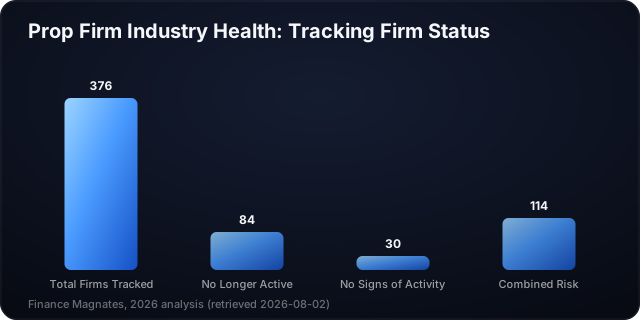
The third fear, the one nobody writes about, is that the firm stops existing while your account is open. That fear is not paranoid. In a 2026 Finance Magnates analysis, the author reports that up to 100 prop trading firms did not survive 2024, and that the shake-out continued through 2025: of 376 prop firms in his personal database, 84 were no longer active and another 30 showed no signs of active operation (Finance Magnates, retrieved 2026-08-02). That is one author's database rather than a registry, so treat it as a direction of travel, not a census. If you want to check a firm's payout track record before you get this far, the verification guide for prop firm payouts is the companion question to this article.
The platform layer moves during periods like that too, and for a reason worth internalising: the platform is not part of the firm. It is licensed from a software vendor, on commercial terms the trader never sees. It is a supplier relationship, and suppliers change.
What a platform migration means for an account you already paid for
When a firm switches platforms mid-cycle, the account rules usually survive the move, but the workflow does not. Your ladder entry becomes a ticket window. Your automation stops compiling. Your saved chart templates are gone. None of that voids your evaluation, and none of it is refundable either. If you build your process on a platform feature, you want that feature to exist in more than one platform your firm supports, or you want to know you are exposed. Read the rule set that sits on top of whatever platform you pick with the same eye.
What you can verify on a vendor's own docs before you pay
Three things, per platform, and only three, because these are the ones the vendors publish and stand behind: how the software is delivered to you, what order types and order-management surface it exposes, and whether automation runs natively inside it. Everything else, spreads, commissions, symbol lists, is set by the firm and the liquidity arrangement, not by the platform. For that layer, start with execution costs and slippage, which sits underneath every order type in this article.
cTrader: order types, depth of market and native automation
cTrader is built by Spotware Systems. Its documentation is unusually specific about the order-entry surface, which is why it is the easiest of the three to check.
Four order types and what only a market order guarantees
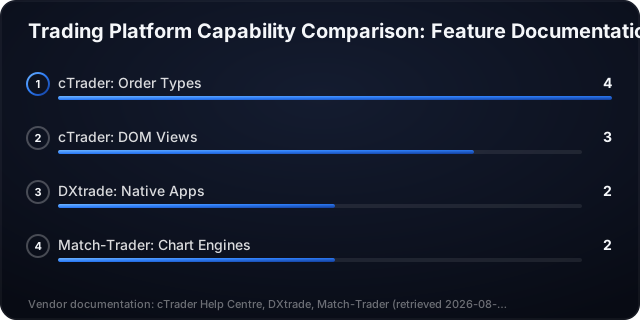
cTrader documents four order types for buying or selling an instrument, market, limit, stop and stop-limit, with only market orders filling immediately at the best available price (cTrader Help Centre, retrieved 2026-08-02).
Read that last part slowly, because it is where drawdown rules and order types collide. A stop order is an instruction to fill at the best available price once your stop level is reached. Best available is not the same as your level. On a gap, "best available" can be materially worse, and the loss that lands in your account is the one that counts against your maximum daily loss, not the one you intended. A stop-limit protects the price and gives up the certainty of the fill. Neither choice is free. This is the same mechanism behind most breaches worth avoiding; see how to avoid breaching prop firm drawdown limits for the rule side of it.
Three Depth of Market views and who each is for
cTrader documents three Depth of Market views: Standard DOM (view only), Price DOM (trade directly from the ladder with stop or limit orders), and VWAP DOM (volume-weighted average price for large volumes) (cTrader Help Centre, retrieved 2026-08-02).
If you have never traded from a ladder, this changes nothing for you. If you have, it is the single largest workflow difference in this article. Standard DOM shows liquidity at each price and does not let you trade from it. Price DOM does: you place and manage stop or limit orders in the ladder itself. VWAP DOM exists for sizing that would otherwise sweep several price levels. A trader who entered from a ladder for two years does not adapt to a ticket window in a week, and an evaluation is a bad place to find that out.
cBots in C# or Python inside the platform
cTrader documents native support for algorithmic trading at the software level: traders can build automated trading robots (cBots), indicators and plugins in C# or Python inside the platform's built-in code editor (cTrader Help Centre, retrieved 2026-08-02).
Two words carry the weight: natively and built-in. There is no bridge process, no separate terminal, no third-party connector to keep alive. If your edge is code, this is the concrete question to answer before you pay: is my language on that list. If it is not, you are budgeting a rewrite, not a subscription.
One firm-level data point, for availability only and not as a firm review: FTMO offers cTrader as one of its trading platforms, describing it as a professional-grade platform for both discretionary and algorithmic traders (FTMO, retrieved 2026-08-02). If you are weighing that firm against others on more than platform, the fee and rule comparison is the wider view.
DXtrade: browser-delivered, widget-based, multi-asset
DXtrade is built by Devexperts. Its public documentation is strongest on delivery and asset coverage, and quieter on the order-entry detail cTrader publishes. This section reports what is documented and stays silent on the rest. Silence here is not a criticism of the platform; it is a refusal to infer parity from an absence.
Web terminal vs downloaded terminal: what changes for you
DXtrade XT (Devexperts) is delivered as a browser-based web trading terminal with a modular, widget-based UI, in which widgets are arranged across multiple tabs to form a workspace, rather than as a downloaded desktop terminal (DXtrade XT Web Trader, retrieved 2026-08-02).
Practically, that means your workspace is arrangeable in tabs of widgets and follows you to any machine with a browser and your login. It also means you have no local install to fall back on, and your session lives inside a browser tab with everything else you have open. Neither of those is theoretical during a fast session.
Native mobile apps
DXtrade XT provides native iOS and Android trading apps in addition to its web terminal (DXtrade, retrieved 2026-08-02). Note the distinction the outline of this comparison keeps deliberately separate: browser delivery is about how the desktop experience reaches you, and it says nothing about phone support. Here they are two documented facts, not one.
Multi-asset coverage and why breadth is not the same as availability at your firm
DXtrade documents itself as a multi-asset platform covering stocks, futures, options, FX, CFDs, spread bets and crypto (DXtrade, retrieved 2026-08-02).
That is the platform's capability, not your account's symbol list. A prop firm decides which instruments it enables, and a platform that supports options does not mean the firm offers you options in a simulated evaluation account. Check the firm's own symbol documentation, not the vendor's. If you are still forming the mental model of what a funded account contains, the difference between demo and funded trading is the place to start.
third-party platform: dual charting, drag-and-drop order management, branded mobile
Disclosure first, because it matters more than the section: ITAfx runs third-party platform (itafx.com). That is exactly why this section cites nothing but Match-Trade Technologies' own product documentation and makes no comparative quality claim.
Two charting engines on one platform
third-party platform ships with built-in TradingView charts alongside an in-house charting engine, giving traders two chart types on the same platform (third-party platform, retrieved 2026-08-02).
The value is not "TradingView is good." It is that a trader whose analysis lives in TradingView drawings and indicators does not maintain a second window and a second mental map. Whether your specific indicator set carries over is a question for your firm's deployment, not the vendor page.
Setting TP and SL from the chart
third-party platform documents chart-based position management, letting traders set Take Profit and Stop Loss by drag-and-drop directly on the chart (third-party platform, retrieved 2026-08-02).
Small feature, real consequence. When your maximum daily loss is a hard breach rather than a suggestion, the number of clicks between "this is wrong" and "the stop is placed" is a risk parameter. Dragging a level is fewer clicks than typing a price into a ticket. It is also easier to fat-finger, which is the honest other half.
Branded app
third-party platform is documented as a web-based platform that seamlessly adapts to the screen's resolution for mobile users, and each third-party platform broker gets its own app with a custom logo and name (third-party platform, retrieved 2026-08-02).
Branded means the app may carry your firm's name rather than the vendor's, so searching the vendor name in an app store can wrongly suggest no app exists. Ask the firm what its app is called. The vendor sources used here do not document push notifications or a separately built native app, so treat both as questions for the firm rather than assumptions.
The comparison table: what is documented, side by side
Every cell below traces to a vendor claim in the sources listed. Where a vendor source does not document something, the cell says so rather than guessing.
| Platform | Delivery model | Order types (as documented) | Charting | Automation (as documented) | Mobile | Vendor doc source |
|---|---|---|---|---|---|---|
| cTrader | Not documented in the vendor sources used here | Market, limit, stop, stop-limit; only market fills immediately at best available price (cTrader Help Centre, retrieved 2026-08-02) | Three DOM views: Standard (view only), Price (trade from ladder), VWAP (cTrader Help Centre, retrieved 2026-08-02) | Native cBots, indicators and plugins in C# or Python in a built-in code editor (cTrader Help Centre, retrieved 2026-08-02) | Not documented in the vendor sources used here | help.ctrader.com |
| DXtrade | DXtrade XT: browser-based web terminal, modular widget UI arranged in tabs, not a downloaded desktop terminal (DXtrade XT Web Trader, retrieved 2026-08-02) | Not documented in the vendor sources used here | Not documented in the vendor sources used here | Not documented in the vendor sources used here | Native iOS and Android apps alongside the web terminal (DXtrade, retrieved 2026-08-02) | dx.trade |
| third-party platform | Web-based, adapts to screen resolution (third-party platform, retrieved 2026-08-02) | Chart-based management: drag-and-drop Take Profit and Stop Loss (third-party platform, retrieved 2026-08-02) | Two engines: built-in TradingView charts plus in-house charts (third-party platform, retrieved 2026-08-02) | Not documented in the vendor sources used here | Web-based, adapts to screen resolution; each broker gets its own app with custom logo and name (third-party platform, retrieved 2026-08-02) | third-party platform.com |
Three cells reading "not documented" is the honest output of this method. A comparison that filled them would be inventing parity, and you would find out it was invented after paying.
Which prop firms run which platform right now
Availability only. This is not a ranking of these firms and says nothing about their rules, fees or payout behaviour.
FTMO offers cTrader as one of its trading platforms, describing it as a professional-grade platform for both discretionary and algorithmic traders (FTMO, retrieved 2026-08-02). FundedNext lists both cTrader and third-party platform among the trading platforms a funded (simulated-capital) trader can select, with one documented limitation worth reading before you buy: accounts with balances of $100,000 and $200,000 cannot be purchased, modified, reset or topped up on cTrader or third-party platform, except for U.S. traders using third-party platform (FundedNext Help Center, retrieved 2026-08-02). ITAfx runs third-party platform (itafx.com).
Treat all three lines as volatile. Re-check each on the firm's own site on the day you pay. If you are still comparing firms more broadly, how to choose the right prop firm for forex trading covers the criteria beyond the platform layer.
Why a firm's platform menu can change without notice
A platform is a commercial contract between the firm and a technology vendor, renewed and renegotiated on a schedule you never see. Nothing obliges a firm to announce that the contract changed, and nothing in a vendor's documentation tells you which firms are currently licensing it. That is why every firm-level line in this article carries a retrieval date and an instruction to re-check it on the firm's own site.
How to pick: a five-question check before you pay an evaluation fee
Answer these on the vendor's documentation and the firm's own site, in this order.
- Does the platform natively support my automation language? If your edge is code, this is the first filter, not the fifth. cTrader documents C# and Python in a built-in editor (cTrader Help Centre, retrieved 2026-08-02). The other two vendors do not document automation in the sources used here, so ask the firm directly and get the answer in writing.
- Do I need DOM or ladder entry? If yes, you need a platform that supports trading from the ladder, not only viewing it: cTrader documents Price DOM for exactly that, and Standard DOM explicitly for viewing only (cTrader Help Centre, retrieved 2026-08-02). If ladder entry is not part of your process, skip this entirely.
- Does the firm's platform menu include it for my account type? Vendor capability is not firm availability, and firm availability can vary by account type and region. FundedNext, for example, offers cTrader and third-party platform but documents that $100,000 and $200,000 balances cannot be purchased, modified, reset or topped up on either, except for U.S. traders on third-party platform (FundedNext Help Center, retrieved 2026-08-02).
- Does mobile match what I actually need? Managing an open position from a phone is a different requirement from opening one. DXtrade documents native iOS and Android apps (DXtrade, retrieved 2026-08-02). third-party platform documents a web platform that adapts to the screen's resolution for mobile users, with each broker getting its own app under a custom logo and name (third-party platform, retrieved 2026-08-02).
- Is my charting workflow native or a bolt-on? If your analysis lives in TradingView, third-party platform documents it as built-in alongside an in-house engine (third-party platform, retrieved 2026-08-02). Anywhere else, budget for a second window.
For ITAfx account mechanics, including how an instant-funding simulated account starts without an evaluation time limit (itafx.com), the instant-funding route walks through it.
Ready to get funded?
50% off instant accounts with code 50CRYPTO.
Get Funded →Frequently Asked Questions
Which platform do most prop firms use?
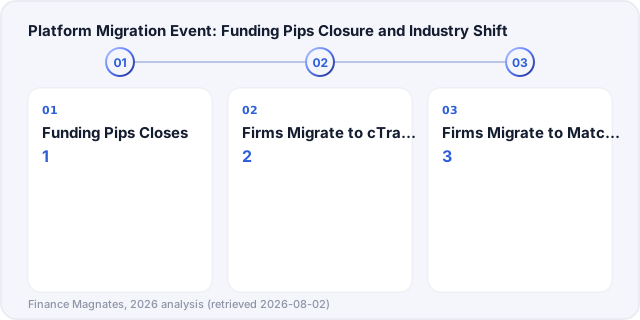
This article does not claim a market-share figure, because no vendor-verified one is in its sources. What is documented is the direction of movement: Finance Magnates reports that after Funding Pips abruptly closed on February 14th, prop firms began migrating to alternative platforms from Match-Trade Technologies (third-party platform) and Spotware Systems (cTrader) (Finance Magnates, retrieved 2026-08-02).
Does DXtrade support automated trading?
The Devexperts sources used for this article do not document automation support, so this article does not state one way or the other. Ask the firm you are considering, and ask for a documentation link rather than a support-chat opinion.
Is a web-based platform worse than a downloaded one?
Different, not worse, and the documentation supports that framing rather than a ranking. DXtrade is delivered as a browser-based web terminal with a modular widget UI rather than a downloaded desktop terminal (DXtrade, retrieved 2026-08-02). third-party platform is web-based and adapts to the screen resolution for mobile users (third-party platform, retrieved 2026-08-02). Judge it against your own setup: multiple monitors, connection stability, whether you need the workspace to follow you between machines.
Can I use TradingView charts at a prop firm?
On third-party platform, TradingView charts are built in alongside an in-house engine (third-party platform, retrieved 2026-08-02). Whether your specific saved layouts and indicators travel is a question for the firm's deployment.
What platform does ITAfx use?
third-party platform (itafx.com). Capital in every ITAfx evaluation and funded environment is simulated. If the term "funded account" is new to you, the beginner's guide to prop firm evaluations covers the model first.
Does the platform affect whether I pass an evaluation?
Not directly. The rules do. But the platform sets how quickly you can act on a rule, which is why order-entry surface and drag-and-drop stop placement appear in this article at all. Rules first, platform second: read the rule set before the feature list.
Ready to get funded?
Instant accounts, simulated capital, rules published before you pay. 50% off with code 50CRYPTO.
Get Funded →